नमस्ते दोस्तों!
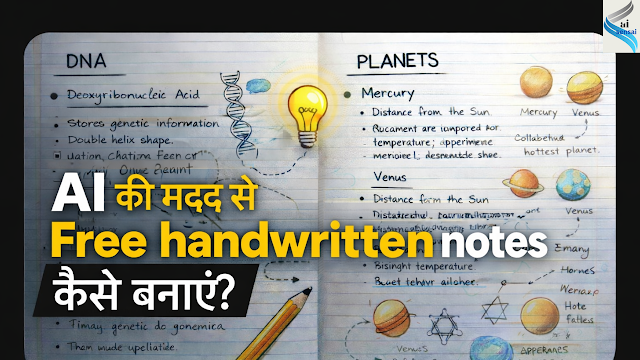
मैं खुद एक student हूँ, और exams के बीच handwritten notes बनाना हमेशा से बड़ा headache रहा है। messy handwriting, time लगना, और syllabus का pressure… सब कुछ एक साथ!
इसी struggle को solve करने के लिए मैंने Google Gemini AI try किया और मुझे results real handwritten style में मिले। जो revision के time सच-मुच काम आए।
इस article में आप सीखेंगे कि :
• AI की मदद से free handwritten notes कैसे बनाए जाएँ?
• Gemini में सही prompt कैसे डालें?
• और कम समय में effective revision material कैसे तैयार करें?
अगर आप पढ़ाई का stress कम करना चाहते हैं और smart तरीके से notes बनाना चाहते हैं, तो यह guide आपके लिए बहुत काम की होने वाली है।
Ethical Use & Disclaimer :
AI tools का उपयोग सिर्फ learning और study support के लिए करें। AI से बने notes को direct copy या exam/assignment में use न करें। ये notes केवल personal study और revision purpose के लिए हैं।
इस article का उद्देश्य students को smart तरीके से पढ़ाई करने के लिए guide करना है, ताकि वे technology का ethical और responsible तरीके से उपयोग कर सकें।
Gemini AI से Handwritten Notes बनाने का Step – by – Step Process
Step 1: Gemini AI Open करे।
सबसे पहले आपको Gemini AI open करना होगा।
आप mobile browser (Chrome) या laptop/PC दोनों में Gemini AI use कर सकते हैं।
Best experience के लिए laptop recommend किया जाता है, क्योंकि long prompts लिखना और output manage करना आसान होता है।
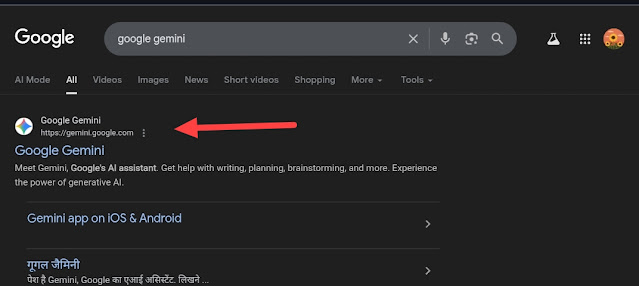
Serach करे Google Gemini और जैसे नीचे स्क्रीनशॉट में दिखाया है वैसे ही फर्स्ट रिजल्ट पे क्लिक करे।
Step 2 : Account Login Basics
Gemini AI use करने के लिए आपको एक Google account से login करना होता है।
अगर आपके पास Gmail ID है, तो अलग से account बनाने की जरूरत नहीं है।
Login के बाद आपको chat-like interface दिखेगा, जहाँ आप अपना prompt type करते हैं।
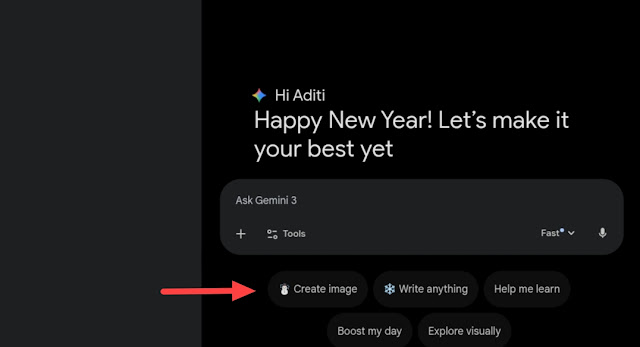
और फिर आपको क्रिएट इमेज पे क्लिक करना है।
Step 3 : सही prompt add करना।
❌ Wrong Prompt Example :
Types of forests ke notes do।
👆 इससे Output basic और generic hoga।
सही prompt :
Act as a school student (Class 7–10).

Create detailed notes on the topic: "Types of Forests".

IMPORTANT INSTRUCTIONS:
• Notes must look like handwritten notes made by a real student.
• Content should appear as if written on ruled notebook pages.
• Use blue ink handwriting style (pen-written look).
• Handwriting should be neat but slightly imperfect.
• Maintain proper spacing and margins.

CONTENT STRUCTURE:
• Title at top: "Types of Forests"
• Use headings, subheadings, bullet points.
• Include definitions, characteristics, examples.

FOREST TYPES:
• Tropical Evergreen Forests
• Tropical Deciduous Forests
• Thorn Forests
• Mangrove Forests
• Coniferous Forests

VISUAL STYLE:
• Add diagrams, boxes, arrows, check marks.
• Avoid emojis and digital fonts.

OVERALL LOOK:
• Final output should look like real handwritten notes.
ऊपर दिखाए हुए prompt में केवल आपका टॉपिक and standard change करे। और बाकी सब same रखे।
Step 4 :
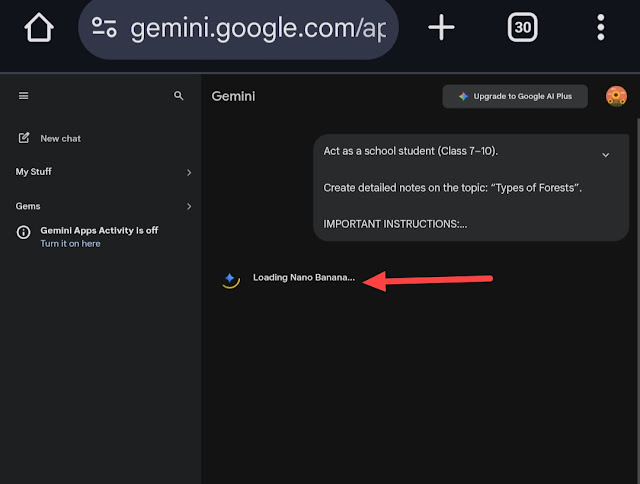
Copy किए हुए Prompt को paste कर दे।फिर loading image दिखेगा। और फिर image ready हो जाएगी।
Step 5 :
👇 देखो prompt ने कितना best result दिया है।😍
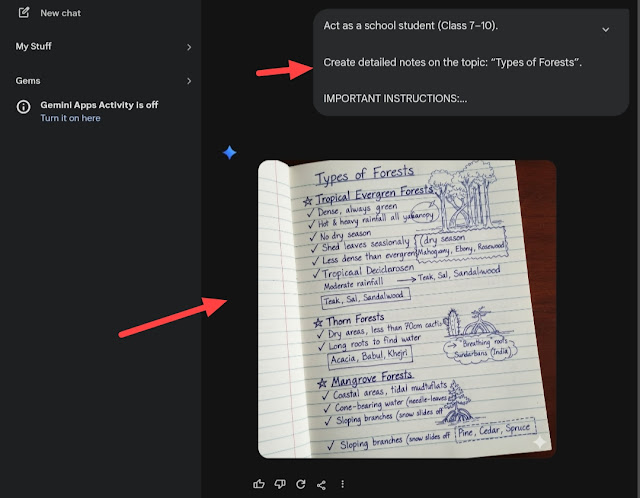
👆 मिली हुई इमेज को tap करके download करे।
Gemini AI से Notes क्यों बनाएँ?
1. Free Usage
Gemini AI का basic version students के लिए free है। बिना कोई पैसा खर्च किए आप इससे notes, explanations और summaries तैयार कर सकते हैं। यह उन students के लिए बहुत useful है, जिनका budget limited होता है।
2. Long content support
Gemini AI long content को बहुत अच्छे से handle करता है।आप चाहें तो इससे , 1–2 page ke notes 10 – 15 topics ke combined notes 3000 – 5000 words तक का detailed content सब कुछ easily generate कर सकते हैं। Competitive exams और board exams के लिए यह feature बहुत helpful है।
3. Prompt-Based Working
Gemini AI prompt-based काम करता है। यानी आप जितना clear prompt देंगे, output उतना ही बेहतर मिलेगा।
Ai से notes बनाने के फायदे और नुकसान
| Advantages of AI Handwritten Notes | Limitations of AI Handwritten Notes |
| 1) Time Saving : AI notes कुछ ही मिनटों में तैयार हो जाते हैं, जिससे घंटों की मेहनत बचती है। | 1) 100% Real Handwriting नहीं : Notes देखने में handwritten जैसे होते हैं, लेकिन पूरी तरह human writing नहीं होते। |
| 2) Revision Friendly : Short और exam-oriented होने के कारण last-minute revision आसान हो जाता है। | 2) Practice की जगह नहीं ले सकता : Student की खुद की handwriting practice इससे develop नहीं होती। |
| 3) Free & Accessible : कई AI tools free होते हैं और mobile/laptop दोनों पर आसानी से available रहते हैं। | 3) Over-Dependence का Risk : ज़्यादा rely करने से self-thinking कम हो सकती है। |
| 4) Neat & Readable Notes : खराब handwriting की problem पूरी तरह खत्म हो जाती है। | 4) Understanding के बिना use करने का खतरा : बिना concept समझे notes use करने से learning weak रहती है। |
| 5) Easy Update : Syllabus change होने पर notes को तुरंत edit किया जा सकता है। | 5) Internet Dependency : AI tools use करने के लिए internet जरूरी होता है। |
Honest Reality (यह जानना ज़रूरी है)
AI notes बहुत helpful होते हैं, लेकिन कुछ बातें clear होनी चाहिए :
• AI notes self-study का replacement नहीं हैं
• Sirf notes पढ़ने से concept clear नहीं होता
• Best result तब मिलता है जब पहले topic समझा जाए, फिर AI notes से revise किया जाए।
• AI को shortcut नहीं, smart support की तरह use करना चाहिए।
FAQs (अक्सर पूछे जाने वाले सवाल)
Q1. क्या AI handwritten notes हर subject के लिए सही होते हैं?
👉 हाँ, लेकिन conceptual subjects में इन्हें reference की तरह use करना बेहतर होता है।
Q2. क्या AI notes से पढ़ाई आसान हो जाती है?
👉 आसान होती है, पर समझ के बिना सिर्फ notes पढ़ना फायदेमंद नहीं होता।
Q3. क्या teachers AI notes पहचान सकते हैं?
👉 अगर बिना समझे same format use किया जाए, तो suspicion हो सकता है।
Q4. क्या AI handwritten notes beginners के लिए ठीक हैं?
👉 Beginners के लिए ये revision support के तौर पर ज़्यादा useful होते हैं।
Q5. क्या AI notes बार-बार update किए जा सकते हैं?
👉 हाँ, यही इनका सबसे बड़ा practical advantage है।
AI से बने handwritten notes एक smart study support tool हैं, लेकिन इनका गलत इस्तेमाल करना सही नहीं है। Students को चाहिए कि वे इन्हें last-moment revision, quick recall और reference के लिए use करें।सही तरीका यही है कि पहले खुद topic समझें, फिर AI notes से revise करें। तभी learning effective होगी और ethics भी बनी रहेगी।
अगर आप पढ़ाई का stress कम करना चाहते हैं और last-moment revision को smart बनाना चाहते हैं, तो आज ही AI tools को सही तरीके से use करना शुरू करें।
AI को shortcut नहीं, बल्कि study partner बनाइए—समझकर पढ़िए, revise कीजिए और confident होकर exam दीजिए।
इस guide को अपने दोस्तों के साथ share करें और smart students की list में शामिल हों!
Disclaimer : The images shown in this tutorial are personal screenshots captured by me and are used solely for educational and informational purposes.